

You will draw a fourbar linkage, set its link lengths exactly, run it with a motor and read the rocker's angle, velocity and acceleration. These are the same numbers you would get from the vector-loop equations by hand.
The mechanism: ground 100 mm, crank 40 mm, coupler 120 mm, rocker 80 mm. The shortest link plus the longest (40 + 120 = 160) is less than the other two (80 + 100 = 180), so by Grashof's rule the crank can turn all the way round: a crank-rocker.
1. Open LinkLab
Open LinkLab in Chrome, Edge, Firefox or Safari. If something is already drawn, click New in the top bar.
The first time you pick a tool, a short guide card shows the clicks. Read it and close it with Got it.
2. Place the two ground pivots
Press G (the Ground pivot tool) and click twice on the sheet, about 100 mm apart on a horizontal line. These are O₂ (left) and O₄ (right).
3. Draw the links
Press K (the Link tool).
- Click the left pivot, then a point up and to the right of it (joint A), then a point further to the right (joint B). This draws the crank and the coupler. Press Esc.
- Click the right pivot, then joint B. This draws the rocker. Press Esc.
The links are numbered 2, 3 and 4; the ground is link 1. A motor (M) appears on the crank by itself: the first link drawn from a ground pivot becomes the input.
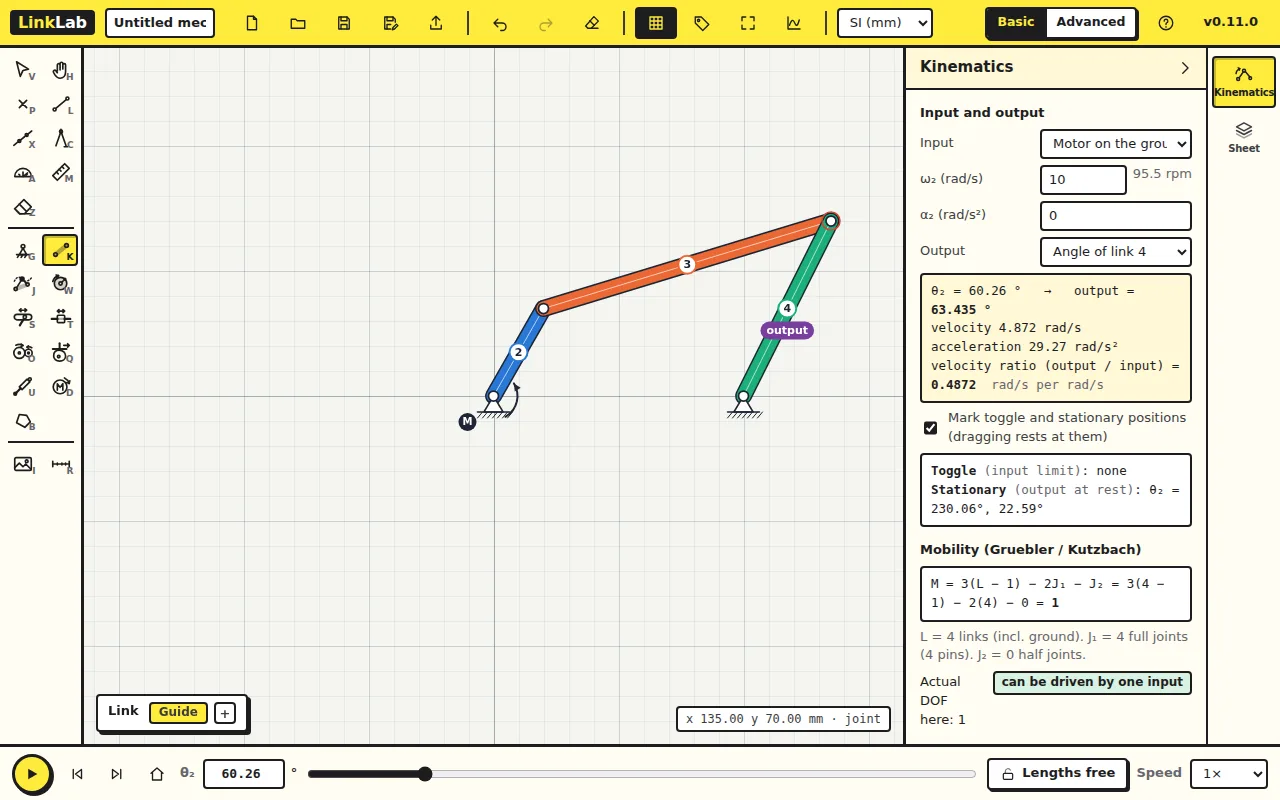
A link on a ground pivot has its angle measured from that pivot, whichever way you drew it: θ₂ from O₂ and θ₄ from O₄, as in the vector-loop equations. A coupler is measured from the joint you clicked first to the second, here A to B.
4. Make it exact
Press V (the Select and move tool). Click each joint and type its Position in the Properties card, pressing Tab after each number. Close the card with its × before clicking the next joint: the card can cover it.
| Joint | x (mm) | y (mm) |
|---|---|---|
| J1, O₂ | 0 | 0 |
| J2, O₄ | 100 | 0 |
| J3, A | 20 | 34.641 |
| J4, B | 133.881 | 72.471 |
This is the mechanism at θ₂ = 60°. Click a link to check its Length: 40, 120 and 80 mm. Press F to fit the drawing in the window.
5. Watch it move
Click the round play button at the bottom left. The crank turns all the way round and the rocker swings back and forth. The Kinematics panel says "Toggle (input limit): none": nothing stops the crank, as Grashof's rule predicted. Click the play button again to stop.
6. Trace a coupler curve
Press J (the Point on link tool) and click the middle of the coupler. LinkLab draws the path of that point over a full turn of the crank: its coupler curve. Points elsewhere on the coupler trace other curves; try a few.
7. Read the numbers
In the Kinematics panel, check that the Output is Angle of link 4. In the box beside θ₂ at the bottom, type 60 and press Enter.
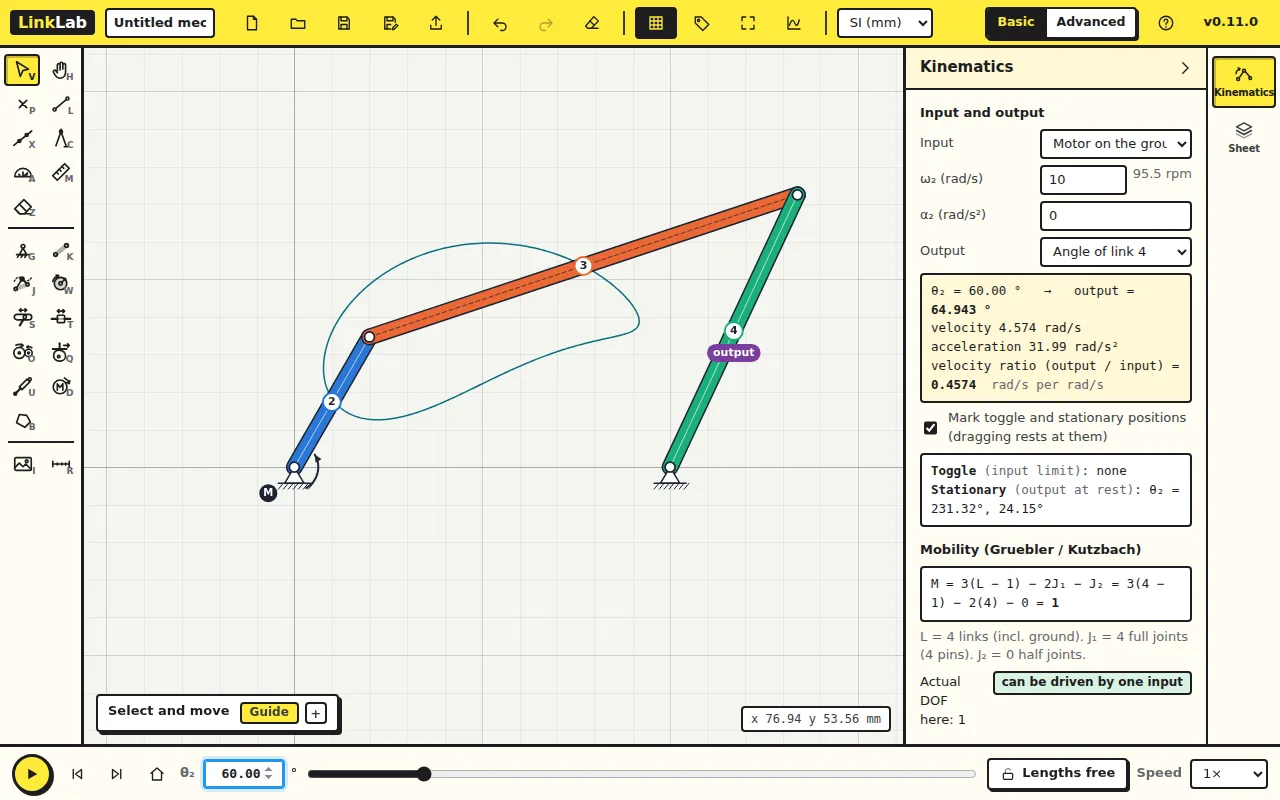
The input turns at ω₂ = 10 rad/s with α₂ = 0, as set in the panel.
Check your numbers
| At θ₂ = 60° | LinkLab |
|---|---|
| Rocker angle θ₄ | 64.943° |
| Rocker angular velocity ω₄ | 4.574 rad/s |
| Rocker angular acceleration α₄ | 31.99 rad/s² |
Work out θ₄ by hand with the vector-loop (Freudenstein) equation and compare.
8. Plot the whole cycle
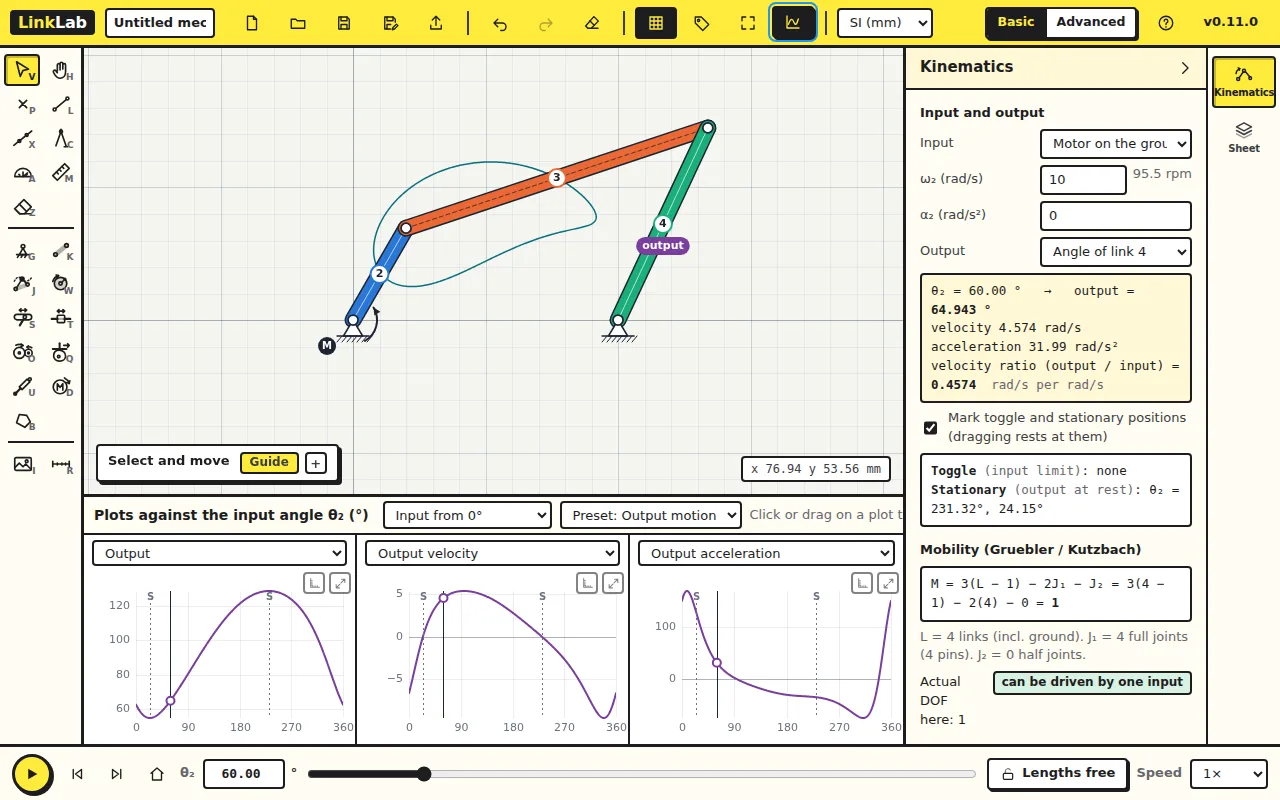
Click Plots in the top bar. The three plots show the rocker's angle, angular velocity and angular acceleration over a full turn of the crank. Click or drag on a plot to move the mechanism to that angle. The rocker swings between 54.90° and 128.68°; the marks S are where it stops and turns back.
Try this
Change ω₂ in the Kinematics panel from 10 to 20 rad/s (press Tab). Before you look: what happens to ω₄ and α₄ at θ₂ = 60°?
Answer
ω₄ doubles to 9.147 rad/s and α₄ goes up four times, to 128 rad/s². With α₂ = 0, velocities scale with ω₂ and accelerations with ω₂², because the shape of the motion depends only on the geometry. The positions do not change at all.